Showing posts with label Oracle WebLogic Server 10g. Show all posts

Monday, October 17, 2011

WebLogic Server Debug Flags to Analyze the Issues and Server Oprations

Note for Using WebLogic Server Debug Flags. 

 These flags can be applied using -Dweblogic.Debug= <Flag>


Also set the following parameter if using the script to apply -Dweblogic.log.LoggerSeverity="Trace" -Dweblogic.log.StdoutSeverityLevel="Debug"


Example -Dweblogic.Debug=weblogic.deployer,weblogic.deployerRuntime,weblogic.deployHelper,weblogic.deployTask


These debug flags are added in the JAVA_OPTIONS in the start script of the server as:
-Dweblogic.debug.DebugJMSBackEnd=true for example.


WLST

-Dwlst.debug.init = true


1—Application related debugs:


Application deployment: (Gives all the information about internal activities when the application is being deployed)

MasterDeployer
ApplicationContainer
DebugAppContainer
DebugDeploy
DebugDeployment
DebugDeploymentService
DebugDeploymentServiceInternal
DebugDeploymentServiceStatusUpdates
DebugDeploymentServiceTransport
DebugDeploymentServiceTransportHttp
DebugWebAppModule


EJBs: (Information on EJB deployments, container, connections)

DebugEjbCaching
DebugEjbCmpDeployment
DebugEjbCmpRuntime
DebugEjbCompilation
DebugEjbDeployment
DebugEjbInvoke
DebugEjbLocking
DebugEjbMdbConnection
DebugEjbPooling
DebugEjbSecurity
DebugEjbSwapping
DebugEjbTimers


For information on Java functionalities and classes of the applications deployed on the server:

ClassChangeNotifier
ClassFinder
ClassLoader
ClassLoaderVerbose
ClassloaderWebApp
ClasspathServlet
DebugBootstrapServlet
DebugClassRedef
DebugClassSize
DebugFileDistributionServlet
DebugJ2EEManagement


JPA – Java Persistence API (Application deployment, runtime information)

DebugJpaDataCache
DebugJpaEnhance
DebugJpaJdbcJdbc
DebugJpaJdbcSchema
DebugJpaJdbcSql
DebugJpaManage
DebugJpaMetaData
DebugJpaProfile
DebugJpaQuery
DebugJpaRuntime
DebugJpaTool


2—Core Concepts related debugs:


Cluster debugs: (Gives more information about cluster activities and data replication service)

DebugCluster
DebugClusterAnnouncements
DebugClusterFragments
DebugClusterHeartbeats
DebugConfigurationEdit
DebugConfigurationRuntime
DebugConnection
DebugConnectorService
DebugConsensusLeasing
DebugDGCEnrollment
DebugDRSCalls
DebugDRSHeartbeats
DebugDRSMessages
DebugDRSQueues
DebugDRSStateTransitions
DebugDRSUpdateStatus
DebugFailOver
DebugLoadBalancing
DebugHttpSessions
DebugReplication
DebugReplicationDetails
DebugRouting
DebugLeaderElection


Cluster messaging mode (Unicast and Multicast)

DebugUnicastMessaging
DebugClusterFragments
DebugClusterHeartbeats


XML parsing flags (To have more information about xml parsers, schema validations, xml entities)

DebugXMLEntityCacheDebugName:
DebugXMLEntityCacheIncludeClass
DebugXMLEntityCacheIncludeLocation
DebugXMLEntityCacheIncludeName
DebugXMLEntityCacheIncludeTime
DebugXMLEntityCacheOutputStream:
DebugXMLEntityCacheUseShortClass
DebugXMLRegistryDebugLevel
DebugXMLRegistryDebugName
DebugXMLRegistryIncludeClass
DebugXMLRegistryIncludeLocation
DebugXMLRegistryIncludeName
DebugXMLRegistryIncludeTime
DebugXMLRegistryOutputStream:
DebugXMLRegistryUseShortClass


JDBC (Get information about datasources, connection pool, connectivity)

DebugJDBCConn
DebugJDBCDriverLogging
DebugJDBCInternal
DebugJDBCRMI
DebugJDBCSQL


Server internal information: (lifecycle, input output)

DebugSelfTuning
DebugServerLifeCycle
DebugServerMigration
DebugStoreAdmin
DebugStoreIOLogical
DebugStoreIOLogicalBoot
DebugStoreIOPhysical
DebugStoreIOPhysicalVerbose
DebugLibraries


Communication related issues in servers:

DebugMuxer
DebugMuxerConnection
DebugMuxerDetail
DebugMuxerException
DebugMuxerTimeout


Resource information:


JMX:

DebugJMX
DebugJMXCompatibility
DebugJMXCore
DebugJMXDomain
DebugJMXEdit
DebugJMXRuntime


SNMP:

DebugSNMPAgent
DebugSNMPProtocolTCP
DebugSNMPToolkit


Server Protocols:


HTTP:

DebugHttp
DebugHttpLogging
DebugTunnelingConnection
DebugTunnelingConnectionTimeout


IIOP:

DebugIIOP
DebugIIOPConnection
DebugIIOPMarshal
DebugIIOPNaming
DebugIIOPOTS
DebugIIOPReplacer
DebugIIOPSecurity
DebugIIOPStartup
DebugIIOPTransport
DebugIIOPTunneling


JNDI related information of resources:

DebugJNDI
DebugJNDIFactories
DebugJNDIResolution

Windows service:

DebugPathSvc
DebugPathSvcVerbose
beasvc -debug “SERVICE NAME”


3– JMS


Basic JMS: (includes information about queues, topics, persistence stores, configurations)

DebugJMSAME
DebugJMSBackEnd
DebugJMSBoot
DebugJMSCDS
DebugJMSCommon
DebugJMSConfig
DebugJMSDispatcher
DebugJMSDistTopic
DebugJMSDurableSubscribers
DebugJMSFrontEnd
DebugJMSJDBCScavengeOnFlush
DebugJMSLocking
DebugJMSMessagePath
DebugJMSModule
DebugJMSPauseResume
DebugJMSStore
DebugJMST3Server
DebugJMSWrappers


SAF:

DebugSAFAdmin
DebugSAFLifeCycle
DebugSAFManager
DebugSAFMessagePath
DebugSAFReceivingAgent
DebugSAFSendingAgent
DebugSAFStore
DebugSAFTransport
DebugSAFVerbose
DebugJMSSAF


Messaging Bridge:

DebugMessaging
DebugMessagingBridgeRuntime
DebugMessagingBridgeRuntimeVerbose
DebugMessagingBridgeStartup
DebugMessagingKernel
DebugMessagingKernelBoot


Resource Adapter:

DebugRA
DebugRAConnEvents
DebugRAConnections
DebugRADeployment
DebugRALifecycle
DebugRALocalOut
DebugRAParsing
DebugRAPoolVerbose
DebugRAPooling
DebugRASecurityCtx
DebugRAWork
DebugRAWorkEvents
DebugRAXAin
DebugRAXAout
DebugRAXAwork


4– JTA (XA and NON-XA)
 
DebugJTA2PC
DebugJTA2PCStackTrace
DebugJTAAPI
DebugJTAGateway
DebugJTAGatewayStackTrace
DebugJTAHealth
DebugJTAJDBC
DebugJTALLR
DebugJTALifecycle
DebugJTAMigration
DebugJTANaming
DebugJTANamingStackTrace
DebugJTANonXA
DebugJTAPropagate
DebugJTARMI
DebugJTARecovery
DebugJTARecoveryStackTrace
DebugJTAResourceHealth
DebugJTAResourceName
DebugJTATLOG
DebugJTATransactionName
DebugJTAXA
DebugJTAXAStackTrace


5– Security


Basic security (SSL, Authentication, authorization, auditing, keystores, roles, policies)

DebugSSL
DebugSecurityAdjudicator
DebugSecurityAtn
DebugSecurityAtz
DebugSecurityAuditor
DebugSecurityCertPath
DebugSecurityCredMap
DebugSecurityEEngine
DebugSecurityEncryptionService
DebugSecurityJACC
DebugSecurityJACCNonPolicy
DebugSecurityJACCPolicy
DebugSecurityKeyStore
DebugSecurityPasswordPolicy
DebugSecurityPredicate
DebugSecurityRealm
DebugSecurityRoleMap
DebugSecuritySSL
DebugSecuritySSLEaten
DebugSecurityService
DebugSecurityUserLockout


SAML:

DebugSecuritySAML2Atn
DebugSecuritySAML2CredMap
DebugSecuritySAML2Lib
DebugSecuritySAML2Service
DebugSecuritySAMLAtn
DebugSecuritySAMLCredMap
DebugSecuritySAMLLib
DebugSecuritySAMLService


6– WLDF (Includes watches, harvester, other modules):

DebugDiagnosticAccessor
DebugDiagnosticArchive
DebugDiagnosticArchiveRetirement
DebugDiagnosticCollections
DebugDiagnosticContext
DebugDiagnosticFileArchive
DebugDiagnosticImage
DebugDiagnosticInstrumentation
DebugDiagnosticInstrumentationActions
DebugDiagnosticInstrumentationConfig
DebugDiagnosticInstrumentationEvents
DebugDiagnosticInstrumentationWeaving
DebugDiagnosticInstrumentationWeavingMatches
DebugDiagnosticJdbcArchive
DebugDiagnosticLifecycleHandlers
DebugDiagnosticQuery
DebugDiagnosticWatch
DebugDiagnosticWlstoreArchive
DebugDiagnosticsHarvester
DebugDiagnosticsHarvesterData
DebugDiagnosticsHarvesterMBeanPlugin
DebugDiagnosticsHarvesterTreeBeanPlugin
DebugDiagnosticsModule

Thursday, January 6, 2011

One Fine Day WebLogic Wanted to Talk Through Apache WebServer.. :)

Hi There,

Today I have something interesting which is been worked out from last few days, as nowadays pulling time for blogging is getting difficult and so posts from me are reduced in number.

However I tried to pull some nice moments out of busy schedule to give you a good Tutorial on how to configure the Apache Web Server with WebLogic Server, though it looks really simple in this post but Apache WebServer configuration at Ubuntu has eaten my ample time to notice.

Well Here we start :

Installing WebLogic Server is Easy and Fast though to help some newbies I am attaching screen shots to understand it in better way ;)

Steps to Install WebLogic Server :

=> Download the required software from http://www.oracle.com if you have valid support contract.

=> Be prepared with all the information where you want to install the WebLogic Server and other architecture plans as you need to specify some of the values while installing WebLogic Server

=>This Post will tell you the installation and configuration story on Linux Operating System (32bit), so I have decided to use Ubuntu Operating System which is free and beautiful

=> Download the WebLogic Server .bin file from Oracle E-Delivery Site or OTN Site from the Downloads Section

=> Open a terminal at your Linux Operating System, Enter as root and execute below command.

"root@shailesh-Inspiron-N4010:/home/shailesh/Oracle#./Oracle WebLogic Server 11g R1(10.3.3).bin"
Extracting 0%........................

Follow the below screens as per the steps execution
The Installer Starts : Click On Next
Select the Middleware Home : Edit Path and Click on Next
Selecting The Software Update Information Preferences : Click On Yes

Select the type of Installation - Select The Components: Click On Next
Choose Product Installation Directory for Various WebLogic Supported Products : Click On Next
Confirmation Screen For Space Usage after the Product Install : Click On Next
Installation Starts : NO INTERVENTION REQUIRED

Installation Done, Click on Done to Start The Quick Start Window for Domain Creation and Others.

Quick Start Window : Click On Getting Started With WebLogic Server 10.3.3
Configuration Wizard Starts
Select Create A WebLogic Domain Go for Second Option if you already have domain created
Select Domain Source : Template Selection


Name of the Domain here is PRDMasterDOmain
User Name/Password Change


Select Mode of Domain Creation : Production Mode
Select Components to Add to the WebLogic Server Before Creating Domain
Specify Admin Server Details : IP Address And Port : Click Next
Just for Information : Click Next
Domain Creation is In Progress
Your home is Created Now : You can Live in there : Click Next
Start The WebLogic Server Domain : As Below
=> Command Instructions : Open The Terminal

shailesh@shailesh-Inspiron-N4010:~/Oracle/WebLogic/Domains$ ls -lrt
total 4
drwxr-x--- 11 shailesh shailesh 4096 2011-01-04 17:55 PRDMasterDomain
shailesh@shailesh-Inspiron-N4010:~/Oracle/WebLogic/Domains$
shailesh@shailesh-Inspiron-N4010:~/Oracle/WebLogic/Domains/PRDMasterDomain/bin$ ./startWebLogic.sh 

..........
..........
..........
## Enter Username and Password You have given during the installation

<4 Jan, 2011 5:57:24 PM IST> <Info> <Security> <BEA-090065> <Getting boot identity from user.>
Enter username to boot WebLogic server:weblogic
Enter password to boot WebLogic server:


<4 Jan, 2011 5:58:18 PM IST> <Notice> <Server> <BEA-002613> <Channel "Default[1]" is now listening on 0:0:0:0:0:0:0:1:7001 for protocols iiop, t3, ldap, snmp, http.>
<4 Jan, 2011 5:58:18 PM IST> <Notice> <Server> <BEA-002613> <Channel "Default" is now listening on 127.0.0.1:7001 for protocols iiop, t3, ldap, snmp, http.>
<4 Jan, 2011 5:58:18 PM IST> <Notice> <WebLogicServer> <BEA-000329> <Started WebLogic Admin Server "AdminServer" for domain "PRDMasterDomain" running in Production Mode>
<4 Jan, 2011 5:58:19 PM IST> <Notice> <WebLogicServer> <BEA-000365> <Server state changed to RUNNING>
<4 Jan, 2011 5:58:19 PM IST> <Notice> <WebLogicServer> <BEA-000360> <Server started in RUNNING mode>

Start The WebLogic Admin Server Console at any Browser
Login with the Username and Password and Here You Get the Consle
=> Here you have your WebLogic Server Installed... It was kind of easy, and here it comes the Apache Web Server Installation
=> Download the Software From http://httpd.apache.org/

And follow following steps to install the Apache Web Server in Your linux Environment.
+ Download the latest version of Apache Web Server : httpd-2.2.17.tar.gz
+ Gunzip and Untar it with commands gunzip and tar -xvf on the software.
+ Navigate to httpd-2.2.17 Directory and execute ./configure command with following arguments
./configure --prefix=/home/shailesh/WebServer/apache2 --enable-so --enable-rewrite --enable-auth-digest=shared

If Using Open SSL in the software use below command.
./configure --prefix=/home/shailesh/WebServer/apache2 --enable-so --enable-rewrite --enable-auth-digest=shared --enable-ssl

+ This command checks for the existing libraries and creates necessary directories for Apache Web Server Installation

+ After the execution stops, execute

./make = It compiles necessary libraries and source files of the Apache Web Server to prepare for installation on the prefix directory

+ Next Comes is
./make install = installs apache Web Server on prefix directory
root@shailesh-Inspiron-N4010:/home/shailesh/WebServer/apache2# ls -rlt
total 60
drwxr-xr-x  2 root root  4096 2010-10-15 00:13 htdocs
drwxr-xr-x 14 root root 12288 2010-10-15 00:15 manual
drwxr-xr-x  3 root root  4096 2011-01-06 21:42 lib
drwxr-xr-x  2 root root  4096 2011-01-06 21:42 modules
drwxr-xr-x  2 root root  4096 2011-01-06 21:42 bin
drwxr-xr-x  4 root root  4096 2011-01-06 21:42 conf
drwxr-xr-x  3 root root  4096 2011-01-06 21:42 error
drwxr-xr-x  3 root root  4096 2011-01-06 21:42 icons
drwxr-xr-x  2 root root  4096 2011-01-06 21:42 logs
drwxr-xr-x  2 root root  4096 2011-01-06 21:42 cgi-bin
drwxr-xr-x  2 root root  4096 2011-01-06 21:42 include
drwxr-xr-x  2 root root  4096 2011-01-06 21:42 build
drwxr-xr-x  4 root root  4096 2011-01-06 21:42 man
root@shailesh-Inspiron-N4010:/home/shailesh/WebServer/apache2#
+ To Start Apache Server, Navigate to bin directory and Execute
./apachectl start (You can provide start/restart/stop commands)


+ Try to access the http://<youripaddress>/  - If we get page saying It works !, then we are done with Apache Installation
Apache Test Page


+ Now to configure the WebLogic Server We have some pre-requisites as below.
-- We need a suitable plugin for the communication protocol to establish
-- We Need the server information from the WebLogic Server to configure at the   Web Server End.
-- We Need Specification like, How to Access the application and Performance tuning configuration which can be set at Web Server Side.

+ Download the WebLogic Server Plug-in from OTN Download site or you may get it in <WL_HOME>\server\plugin directory for appropriate Platform as it is platform dependent code.

+ For Apache Web Server Version 2.2 Download Plugin mod_wl_22.so file for Linux Opertating System and copy it in Apache Software Installation directory under modules (not necessary). (/home/shailesh/WebServer/apache2/modules.)

+ Now the Major Configuration Part :
+ Edit httpd.conf file from /home/shailesh/WebServer/apache2/conf/httpd.conf
+ Add a line to invoke the WebLogic Server Plug-in as below
LoadModule weblogic_module /usr/lib/apache2/modules/mod_wl_22.so

+ And Add below modules for WebLogic Server Configuration


<IfModule mod_weblogic.c>
WebLogicHost 127.0.0.1
WebLogicPort 7001
</IfModule>

+ If I want to access the console application from the Web Server Side, I would put one more module as below.
<Location /console>
SetHandler weblogic-handler
WebLogicHost 127.0.0.1
WebLogicPort 7001
DebugConfigInfo ON
Pathtrim /weblogic
</Location>

Note : For Any Changes You Do At httpd.conf file you have to restart the Apache Web Server.
Note : These Modules you can add anywhere in the file after invoking the Plug-in Module

+ Here we get to see the console accessed over the Web Server Configured for console App.
WebLogic Console Accessed Through Apache WebServer
+ In Similar way try deploying an application at WebLogic Server Side - Sample here is shown for Hello World Application and Add a module as below in httpd.conf file, then restart
<Location /helloworld/*>
SetHandler weblogic-handler
WebLogicHost 127.0.0.1
WebLogicPort 7001
DebugConfigInfo ON
Pathtrim /weblogic
</Location>


+ Try to access it over the Web Server you will see the page as below.


Well, Here I am ending this Tutorial, And I confirm that if you have performed all the steps in this tutorial then you are set up the communication between WebLogic and Web Server..!!

Any Questions / Feedback
mail me @ shailesh.dyade@gmail.com

Thanks to All..

Sunday, July 25, 2010

Managing WebLogic JMX Through JConsole


JConsole is part of JDK, it can be found in $JAVA_HOME/bin directory, and this utility can be used as JMX Console for Managing WebLogic Server, Where you can see the WebLogic Server configuration and invoke various MBean operations, it helps to view and edit the MBean configuration and invoke various JMX Operations on the serverRuntime, serverConnfig and domainRuntime

Here in this post we will see how to setup JConsole for WebLogic Server 10g.

As JConsole is free and distributed with JDK, there is no need of downloading it seperately

We will follow simple steps to setup the JConsole for WebLogic Server
JConsole works in two modes :
  1. Local Process Mode -> Checks for Local Java Process to Manage them through console
  2. Remote Mode ->We Can provide JMX URL to Manage the Remote Java Process
We Normally Use Remote mode as we need to connect the JConsole to MBean Server of WebLogic Application Server

Step 1. Start WebLogic Admin Server

Fig1. Admin Server ProdDomain Started


Step  2. Login to Admin Console and check the domain configuration
Fig 2. Check Domain's Advanced Configuration as The MBean Servers are enabled or not
Step 3. Check for the Parameters "Compatibility MBean Server Enabled" and "Management EJB Enabled" Status ( They Should be Enabled - By Default They are enabled)

Fig 3 : MBean Servers Enabled (Check box checked by default)
 Step 4. Check The Configuration at Admin Server Side in Ports Tab - > IIOP

Fig 4. IIOP Should be enabled in Admin Server IIOP Port Configuration
Fig 5. Provide some user name and password (preferable weblogic/weblogic), as Anonymous users are not allowed to connect to the JMX MBean Server (Advanced Options in IIOP)

Step 5. Save and Activate Changes - This Needs Restart of the Admin Server.
Fig 6. Change in the IIOP Credentials require restart of the Server Affected


Notice that the logs at the startWebLogic.cmd command window shows as below

The non-dynamic attribute DefaultIIOPPasswordEncrypted on weblogic.management.configuration.ServerMBeanImpl@453b029e([ProdDomain]/Servers[AdminServer]) has been changed. This may require redeploying or rebooting configured entities
change has been made which affects the server AdminServer. This server must berebooted in order to consume this change

Step 6. Restart the Admin Server
Fig 7. Stop the Admin Server (Ctrl+C)


Fig 8. Start the Admin Server (startWebLogic.cmd)


Step 7. Start JConsole - Execute following Steps and Verify the output

Microsoft Windows XP [Version 5.1.2600]
C) Copyright 1985-2001 Microsoft Corp.

C:\Documents and Settings\Administrator>cd \

C:\>echo %WL_HOME%
C:\bea\wlserver_10.3

C:\>echo %JAVA_HOME%
C:\Program Files\Java\jdk1.6.0_13
 

C:\>cd %WL_HOME%

C:\bea\wlserver_10.3>cd server

C:\bea\wlserver_10.3\server>cd bin

C:\bea\wlserver_10.3\server\bin>setWLSEnv.cmd

CLASSPATH=C:\bea\patch_wlw1030\profiles\default\sys_manifest_classpath\weblogic_patch.jar;C:\bea\patch_wls1030\profiles\default\sys_manifest_classpath\weblogic_p
atch.jar;C:\bea\patch_wlp1030\profiles\default\sys_manifest_classpath\weblogic_patch.jar;C:\bea\patch_cie670\profiles\default\sys_manifest_classpath\weblogic_pat
ch.jar;C:\bea\JROCKI~1\lib\tools.jar;C:\bea\WLSERV~1.3\server\lib\weblogic_sp.jar;C:\bea\WLSERV~1.3\server\lib\weblogic.jar;C:\bea\modules\features\weblogic.serv
er.modules_10.3.0.0.jar;C:\bea\WLSERV~1.3\server\lib\webservices.jar;C:\bea\modules\ORGAPA~1.5/lib/ant-all.jar;C:\bea\modules\NETSFA~1.0_1/lib/ant-contrib.jar;C:
\Program Files\Java\jdk1.6.0_13\bin;

PATH=C:\bea\patch_wlw1030\profiles\default\native;C:\bea\patch_wls1030\profiles\default\native;C:\bea\patch_wlp1030\profiles\default\native;C:\bea\patch_cie670\p
rofiles\default\native;C:\bea\WLSERV~1.3\server\native\win\32;C:\bea\WLSERV~1.3\server\bin;C:\bea\modules\ORGAPA~1.5\bin;C:\bea\JROCKI~1\jre\bin;C:\bea\JROCKI~1\
bin;C:\Program Files\PC Connectivity Solution\;C:\WINDOWS\system32;C:\WINDOWS;C:\WINDOWS\System32\Wbem;C:\Program Files\IBM\Infoprint Select;C:\Notes;C:\Program
Files\XLView;C:\lotus\compnent;C:\Utilities;C:\Program Files\Common Files\Lenovo;C:\program files\ibm\personal communications\;C:\Program Files\IBM\Trace Facilit
y\;C:\Program Files\Intel\WiFi\bin\;C:\Program Files\ThinkPad\ConnectUtilities;C:\Program Files\Common Files\GTK\2.0\bin;C:\Program Files\QuickTime Alternative\Q
TSystem;C:\Program Files\IBM\edge\lb\servers\lib;C:\PROGRA~1\IBM\edge\icu\lib;C:\PROGRA~1\IBM\edge\admin\platform\bin;C:\PROGRA~1\ibm\gsk7\\bin;C:\PROGRA~1\ibm\g
sk7\\lib;C:\PROGRA~1\IBM\edge\cp\Bin;C:\PROGRA~1\IBM\edge\cp\lib\plugins\pac;C:\Program Files\Java\jdk1.6.0_13\bin;;C:\bea\WLSERV~1.3\server\native\win\32\oci920
_8

Your environment has been set.
C:\bea\wlserver_10.3\server\bin>


C:\bea\wlserver_10.3\server\bin>cd %JAVA_HOME%


Step 8. Execute the following command to invoke "jconsole remote"

jconsole -J-Djava.class.path=%JAVA_HOME%\lib\jconsole.jar;%WL_HOME%\server\lib\wljmxclient.jar -J-Djmx.remote.protocol.provider.pkgs=weblogic.management.remote


Step 9. We will get to see the console as below.
Fig 9 . JConsole Login Screen
Step 10. Please provide Service JMX URL for Admin Server and Specify the MBean Tree to enter as below and their particular JConsole Space.


1. service:jmx:rmi:///jndi/iiop://localhost:7011/weblogic.management.mbeanservers.domainruntime


username/password = weblogic/weblogic
Fig 10. JConsole Domain Run Time Session
2. service:jmx:rmi:///jndi/iiop://localhost:7011/weblogic.management.mbeanservers.runtime
username/password = same as above
Fig 11. JConsole Server Run time Session


3. service:jmx:rmi:///jndi/iiop://localhost:7011/weblogic.management.mbeanservers.edit
username/password = same as above
Fig 12. JConsole Edit Session in Edit Tree.


This is it..!!

Please let me know if you have any feed back suggestion here.


Thanks for Visiting My Blog - Please Share your feed back and ideas.


Regards,
Shailesh Dyade

Saturday, July 24, 2010

Setting Up An Email Alert System To Monitor Server Status Using Diagnostics Module In WebLogic Application Server

We need our application deployed in WebLogic Server to be up all the time, we cannot take risk the application downtime, and we cannot risk our business, but to monitor the servers which hold live applications need monitoring for the application availability.

WebLogic Server allows the usage of external tools and utilities for monitoring of internal application and components by executing various types of operation on MBeans like set() and get(), there are many more tools, utilities are in the market to provide monitoring feature for WebLogic Server and its deployed applications
Here in this post we are going to work/discuss on a Unique feature of WebLogic Server Called WebLogic Diagnostics Framework, In that we are going to work on Diagnostics Modules, with this we can monitor JMX Beans and system statistics.

For Testing purpose we are carrying out the experiment Production Mode Enabled - ProdDomain

(Please Note : Right click and Open In New Window on the images to enlarge it)
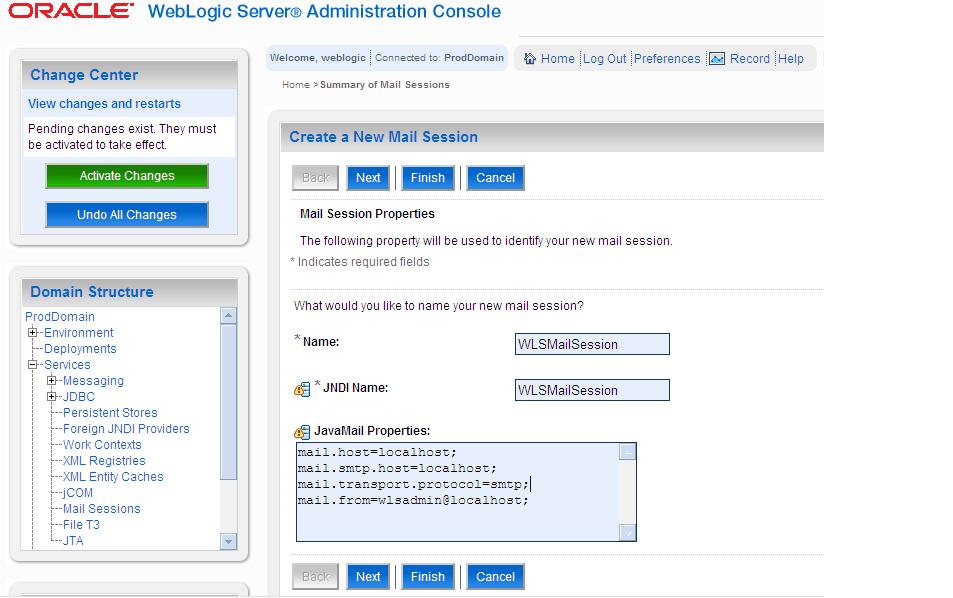
Setup A Java Mail Session

Step 1. Create A Mail Session


Step 2. Specify the connection parameters for Java Mail
Step 3. Target it to Admin Server or Server you wanted to Monitor


Step 4. Verify Mail Session Information
Configuring Diagnostics Modules , Notifications and Watches

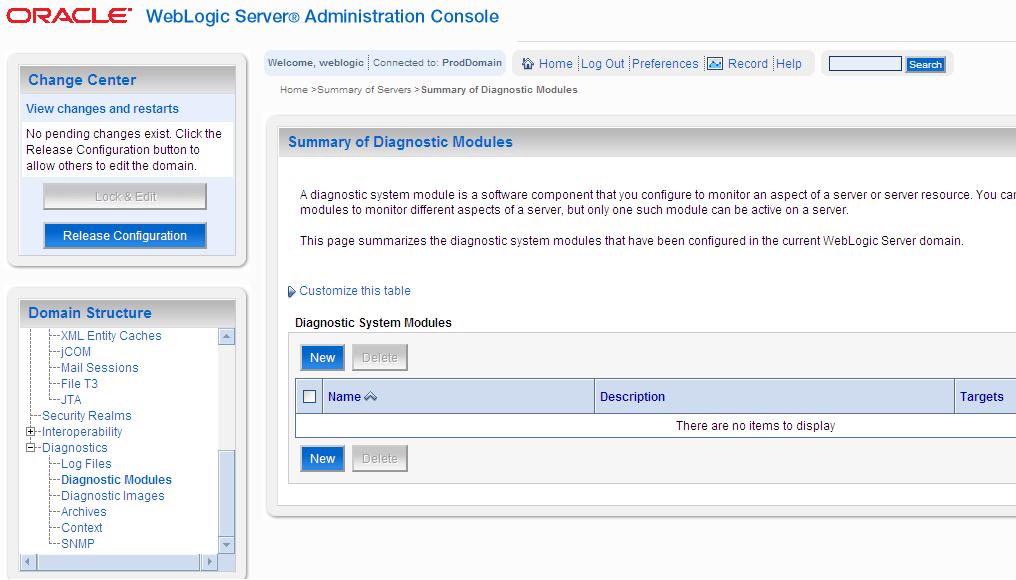
Diagnostics Modules
Step 5. In Left Hand Side Navigation Tree Select Diagnostic Modules to Add New Diagnostic Module Monitor WebLogic Server
Step 6. Enter Basic Information to Create WebLogic Server Diagnostic Module

Create Notifications and Watches
Step 7. Select Watches and Notification Tab and Select Severity and Log Watch Severity to Notice

Step 8. Scroll down on the same page to add new Watches and Notifications
Step 9. Create new Notification as shown above

Step 9. Set Up Email Preferences for the Notification and Finish the Configuration
Step 10. Create the Watch From Where you have created Notifications.
Step 11. Provide Watch Name and Watch Type as above and Keep Enable Watch Checked
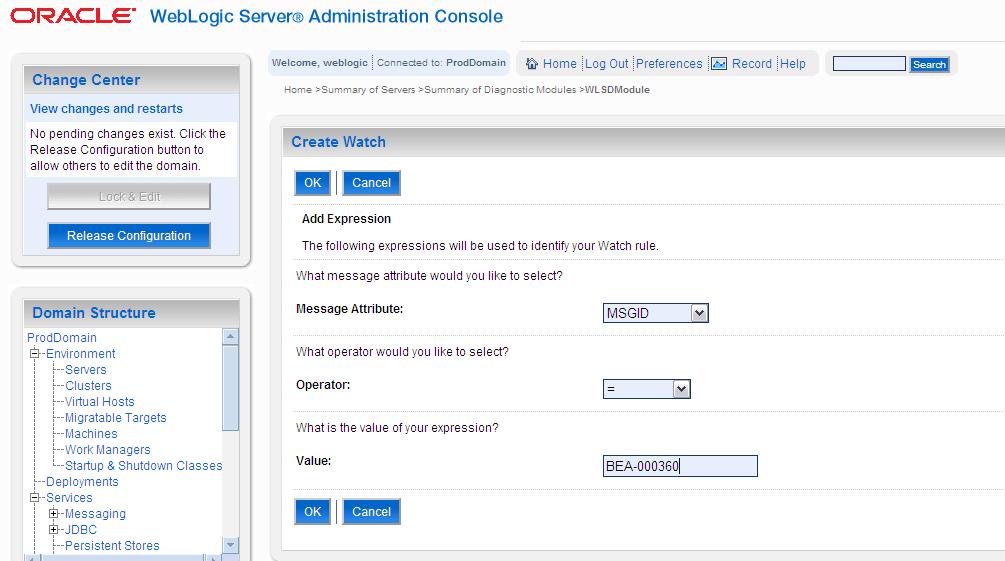
Step 12. Configure What to Watch For the Server After Clicking on Adding Expression
Step 13. You Can Many Number of Watches to the Watch Database you Can see MSGID Updated in above Picture
Please Note : Here We Are setting up the watch and notification for RUNNING Status for the server as BEA-000360 is BEA Message Code for  Server RUNNING Status

Step 14. Do Not Set Any Alarms
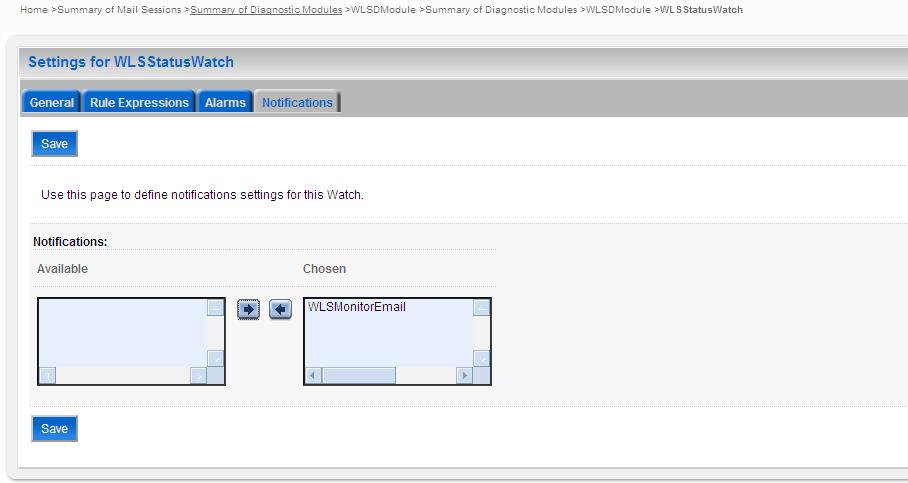
Step 15. Assign the Notification Created for the Status of The WebLogic Server to the Watch Just Created
Step 16. Activate All the Pending Changes

Setup Mail Server For Receiving Mails From WebLogic

Download Apache Mail Server (JAMES) from this link or go to Download Page for latest releases

Unzip the downloaded zip file and follow the following steps

Step 1. Go to C:\James\james-2.3.2\bin directory


Step 2. Edit run.bat file if you are running it in Windows (For Unix you have run.sh file)


Step 3. Add line "set JAVA_HOME=C:\Program Files\Java\jdk1.6.0_13" ( Your JAVA_HOME Directory)


Step 4. Open Command Prompt ( Start -> Run -> CMD -> Enter)


Step 5. Navigate to Path -> C:\James\james-2.3.2\bin


Step 6. Execute run.sh file from this path


You will see following O/P

C:\James\james-2.3.2\bin>run.bat
Using PHOENIX_HOME:   C:\James\james-2.3.2
Using PHOENIX_TMPDIR: C:\James\james-2.3.2\temp
Using JAVA_HOME:      C:\Program Files\Java\jdk1.6.0_13

Phoenix 4.2

James Mail Server 2.3.2
Remote Manager Service started plain:4555
POP3 Service started plain:110
SMTP Service started plain:25
NNTP Service started plain:119
FetchMail Disabled


Your Mail Server is Up Now, The Service is running at 4555 port number on localhost.


Step 7. Telnet to localhost with Port Number 4555


# Default User Name and Password for Mail Server is root/root

Step 8 . Create "WebLogic" User
JAMES Remote Administration Tool 2.3.2
Please enter your login and password
Login id:
root
Password:
root
Welcome root. HELP for a list of commands
HELP
Currently implemented commands:
help                                    display this help
listusers                               display existing accounts
countusers                              display the number of existing accounts
adduser [username] [password]           add a new user
verify [username]                       verify if specified user exist
deluser [username]                      delete existing user
setpassword [username] [password]       sets a user's password
setalias [user] [alias]                 locally forwards all email for 'user' to 'alias'
showalias [username]                    shows a user's current email alias
unsetalias [user]                       unsets an alias for 'user'
setforwarding [username] [emailaddress] forwards a user's email to another email address
showforwarding [username]               shows a user's current email forwarding
unsetforwarding [username]              removes a forward
user [repositoryname]                   change to another user repository
shutdown                                kills the current JVM (convenient when James is run as a daemon)
quit                                    close connection

adduser weblogic weblogic   (weblogic/weblogic - UserName/Password)
listusers
weblogic

Step 9. Set Up A Mail Client ( Can be Mozilla Thunderbird)


Download Mozilla Thunderbird From this link Or Select from latest releases here


Install Mozilla Thunderbird and Configure the POP3 Settings for weblogic user just we've created


Step 9. Time to Test the experiment - Stop the Admin Server in ProdDomain


Step 10. While Starting The WebLogic Admin Server you will see in the below log in console.


tusWatch' with severity 'Notice' on server 'AdminServer' has triggered at Jul 24
, 2010 8:40:07 PM IST. Notification details:
WatchRuleType: Log
WatchRule: (MSGID = 'BEA-000360')
WatchData: DATE = Jul 24, 2010 8:40:07 PM IST SERVER = AdminServer MESSAGE = Ser
ver started in RUNNING mode SUBSYSTEM = WebLogicServer USERID = SEV
ERITY = Notice THREAD = Main Thread MSGID = BEA-000360 MACHINE = shdyade TXID =
 CONTEXTID =  TIMESTAMP = 1279984207391
WatchAlarmType: None
WatchAlarmResetPeriod: 60000
>

Step 11. Check The Mail


This is it...  :)


Please let me know if any questions/suggestions, mail me for feedback on this